

The Engine of Agentic AI: From Reasoning to Action
Beyond retrieving information, AI Agents make decisions, access customer data, and take actions. Understanding this loop is the difference between systems that answer questions and systems that solve problems.
You've built a RAG system for customer support that works beautifully. A customer asks "How do I pay my bill?" and the system retrieves the payment policy, explains the steps, handles different phrasing ("What's the process to settle my account?"). It answers questions.
Then the customer asks: "Find my latest bill and tell me when it's due."
The RAG system could retrieve the payment policy document and explain billing terms. But it gets stuck when it needs to actually look up that customer's latest bill. It can't check the specific due date for their account. It can't see payment history or status. It's built to retrieve and explain, not to access data. So it either hallucinates or says it doesn't have access to that information.
That's the moment you realize basic RAG, that is answering questions with retrieved documentation, isn't enough for this problem. Not because RAG is flawed. Because the problem fundamentally changed.
Basic RAG solves: "Given context about policies, how do I explain this to the customer?"
AI Agents solve: "What customer-specific data do I need to access, and what should I do with that data?"
These require different system designs. This post explores that difference.
What Actually Changes: Understanding the Loop
It's tempting to think an AI Agent is just "an LLM with tools." That's not wrong. But it misses the architectural shift.
A better way to think about it: >An AI Agent is a system where the model makes decisions about customer needs, retrieves data or calls tools based on those decisions, observes the result, and decides again, in a loop, until the customer's issue is resolved or escalated.
This is the difference between a system that answers once and a system that keeps working until the problem is solved.
Consider the difference: Google NotebookLM is pure RAG. You give it documents. It retrieves them. It explains them. The conversation ends. In contrast, an AI Agent like Webex Contact Center AI Agent is different. It handles customer interactions. It understands intent. It accesses customer data. It can resolve issues, escalate when needed, and complete actions, all this without waiting for human instruction.
Same foundation (LLM + retrieval + access to tools). Completely different architecture. RAG adds retrieval to the model. Agents add decision-making, iteration, and action.
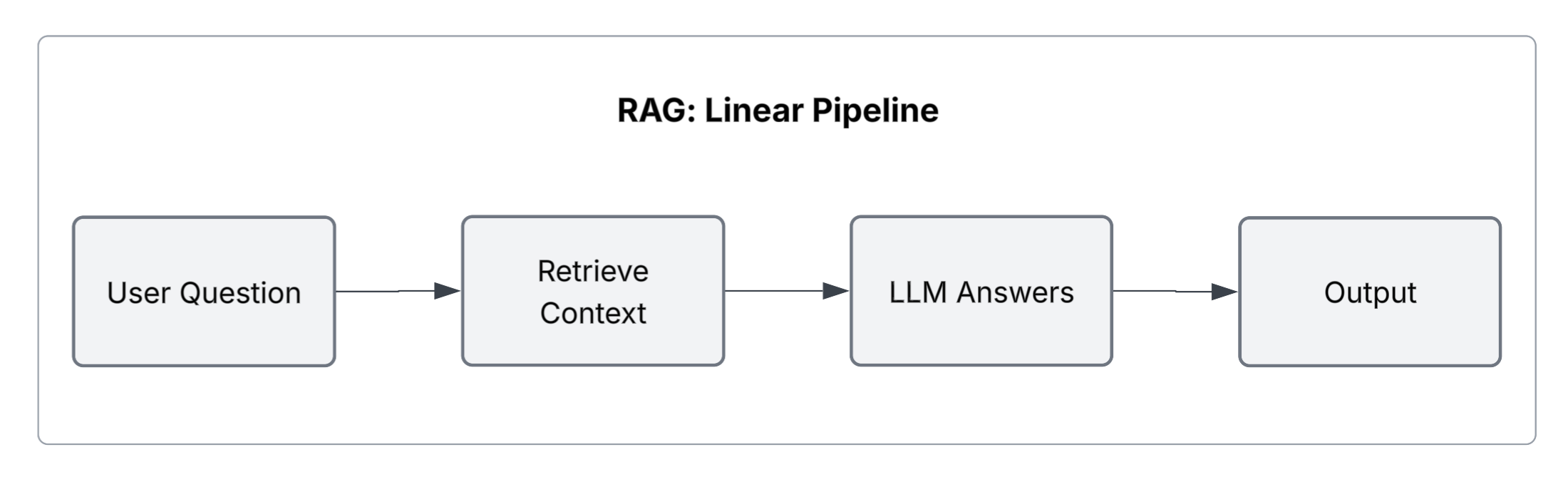
In a RAG system, the flow is simple and linear:
- Customer asks a question about policies or processes
- System retrieves relevant documentation
- Model explains the answer
It works because the problem is straightforward: retrieve policy information and explain it.
But many real-world support scenarios aren't like that. They require accessing customer-specific data. They require decisions based on that data. They require actually doing something about it.
The customer-specific question scenario:
- "Find my latest bill" -> requires querying customer billing history, not documentation
- "When is it due?" -> requires interpreting data, comparing dates, understanding account status
- "Can I get a payment plan?" -> requires checking account history, verifying eligibility, potentially creating a request
No single retrieval from your policy documentation solves this. The system has to reason about what data it needs, retrieve customer-specific information, observe the result, then decide what to do next. That's the loop.
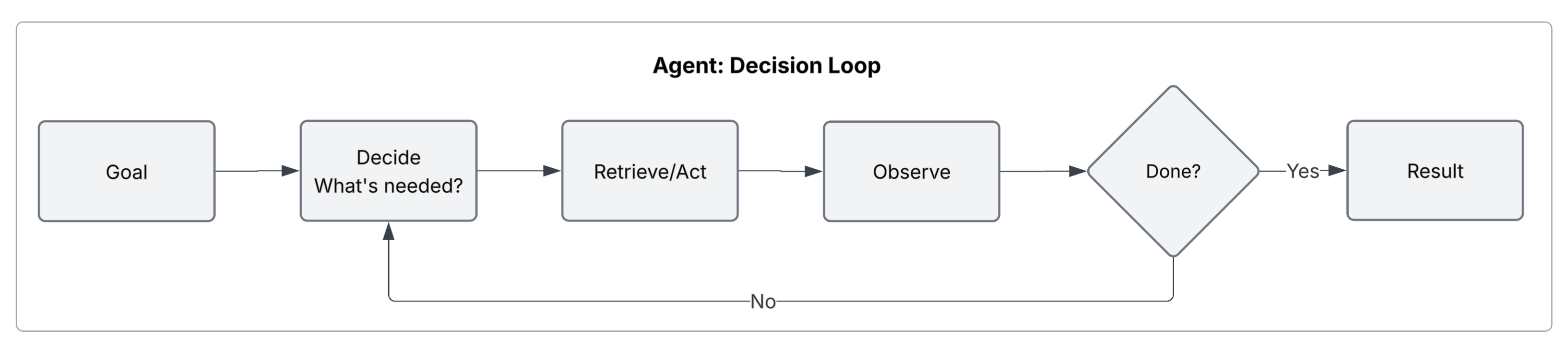
At the core, nothing about RAG goes away. The same foundations, chunking, embeddings, vector databases, still matter for retrieving policy information. The difference is that AI Agents add two critical layers: accessing customer-specific data (not just documents) and taking actions that change state.
In RAG (like NotebookLM): Retrieval is automatic and one-way. When a customer asks "How do I pay my bill?" the system retrieves the payment policy documentation and explains it. The interaction ends.
In an AI Agent (like Webex Contact Center AI Agents): Retrieval becomes a decision in an ongoing loop. When a customer asks "What's my current balance?", the system must decide: Do I need to query the billing database? Do I need to retrieve policies? Do I have enough information? And crucially: what action should I take next? Should I wait for their next message, or should I proactively resolve their issue?
The role of the model changes as well.
In RAG: "Given this policy documentation, how do I explain this to the customer?"
In an AI Agent: "What does the customer need? What data or actions will solve their problem? What's my next step?"
That single shift is what forces a completely different architecture.
And then there's the final piece, action. This is what turns a system from something that answers questions into something that actually solves problems. Querying a customer database. Checking payment history. Creating a support ticket. Initiating a refund. Scheduling a callback. These are not side features. They're what make the system genuinely useful.
What makes all of this an AI Agent isn't any single component. It's the continuous loop. The system understands the customer's goal. Decides what data or actions it needs. Retrieves information or takes action. Observes the result. Decides again. That cycle continues until the problem is solved or the goal is achieved. It doesn't stop after one exchange.
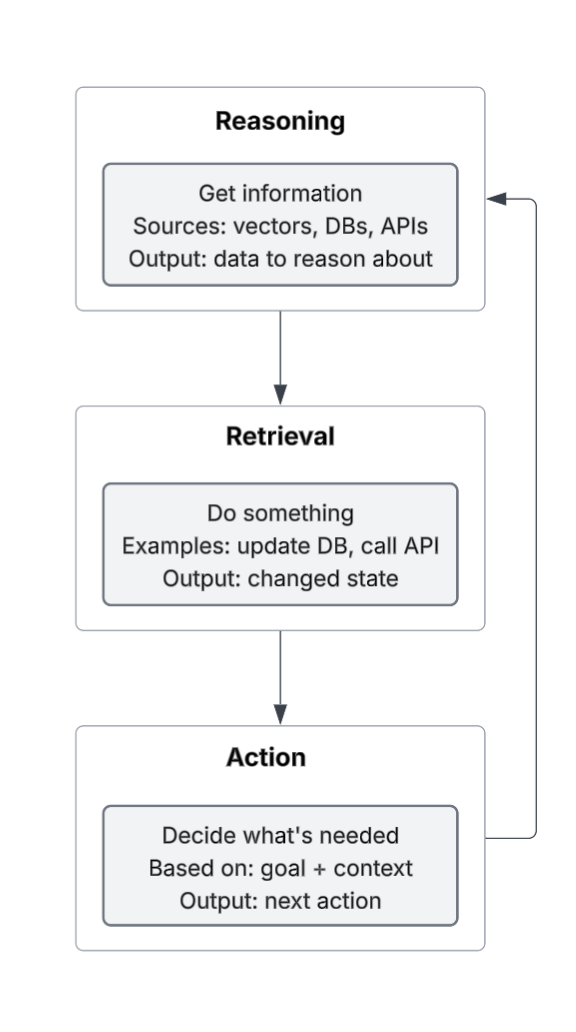
The Three Components: Reasoning, Retrieval, Action
Let's break down what's actually happening in that loop.
Reasoning: The Decision Layer
The LLM isn't just answering anymore. It's deciding.
"I have a customer request. I have context about policies and possibly about this customer's account. What do I need to do next?"
In the billing scenario:
- "The customer asked about their latest bill. I need to query their account to find it." -> Decision: access billing database
- "I found the bill. Now I need to determine when it's due based on their account terms." -> Decision: check customer-specific terms
- "The customer asked about a payment plan. I need to check their account history and eligibility." -> Decision: call the eligibility checker
Each decision is reasoned. The model isn't following a hardcoded script. It's deciding based on what it knows about the customer's situation.
The key difference from RAG: The model doesn't just consume retrieved policy documentation. It produces decisions about what customer data to access and what actions to take.
Retrieval: Now a Decision, Not an Assumption
In RAG, you retrieve documentation automatically. The system is designed to always pass relevant policies to the LLM before reasoning. In an AI Agent, retrieval is conditional and multi-source. The system retrieves when the model decides it needs to, and it retrieves from different sources.
"Do I have enough information to help the customer? Or do I need to look up something in their account? Or check policies?"
In the billing scenario:
- Model decides: "I need this customer's billing information" -> queries the billing database
- Model decides: "I need to know the payment terms for their account type" -> retrieves from policy documentation (vector search)
- Model decides: "I have enough information" -> moves to reasoning about the answer
Sometimes the model retrieves from vectors (policy docs). Sometimes from databases (customer data). Sometimes from APIs (eligibility checks, account status). Sometimes it decides it doesn't need to retrieve anything, it has what it needs. This flexibility is what makes agents powerful and complex.
Action: What Makes It Useful
This is the piece that separates "helpful" from "problem-solving." RAG can retrieve policies. It can explain them. But it can't change anything for the customer.
AI Agents can address this. They can:
- Access customer databases (look up account history, billing info, service records)
- Query backend systems (check eligibility, validate rules, verify account status)
- Execute workflows (create support tickets, escalate to humans, apply credits, update account info)
- Communicate proactively (send notifications, schedule callbacks, summarize resolutions)
In the contact center scenario, action is what actually resolves the customer's problem. Without it, the system just explains policies or recites information. With it, the system can identify billing errors, offer solutions, apply credits, or escalate intelligently.
Actions have consequences. This is why AI Agents are more complex and riskier than RAG systems. A retrieval mistake in RAG means a customer gets slightly wrong policy information. An action mistake in an agent means a refund processed incorrectly, a ticket created in the wrong system, or data updated wrong.
That risk is why design matters so much.
The AI Agent Loop: How It All Connects
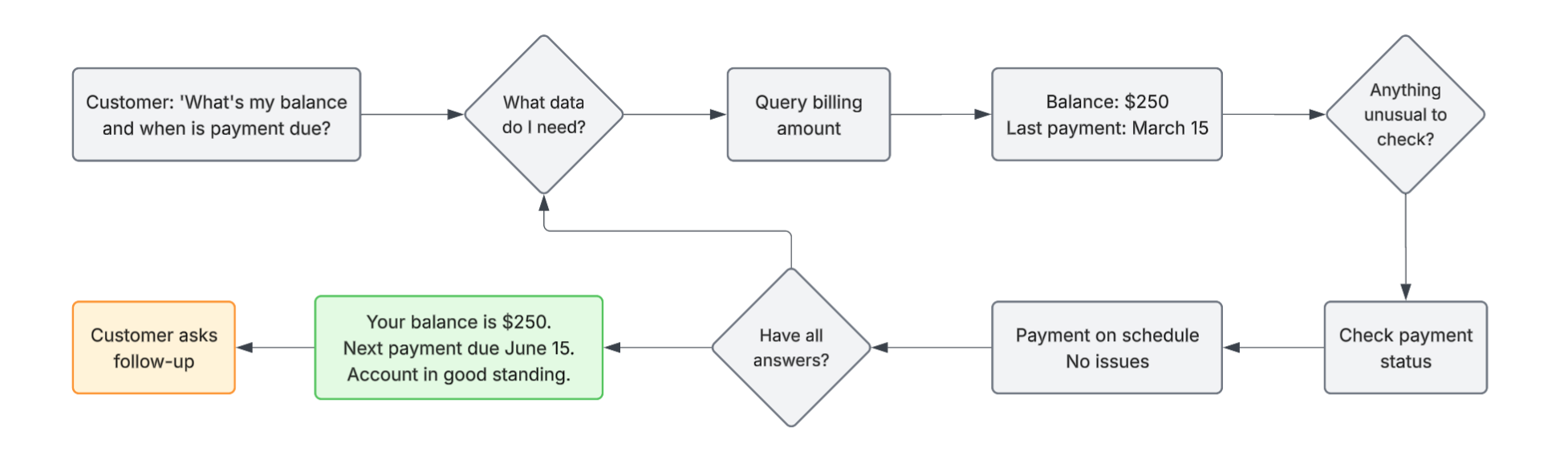
Here's the cycle in practice:
Step 1: Understand the Customer's Goal
Customer: "I need to know my current outstanding balance and when my next payment is due."
AI Agent understands: This requires looking up customer-specific account data, not just explaining policy.
Step 2: Reason About What's Needed
Agent: "To answer this, I need to access the customer's billing account and their account-specific terms."
Step 3: Retrieve or Act
Agent calls: get_customer_account(customer_id)
Result: Account status, current balance $2500, last payment date 2026-03-15
Agent also calls: get_account_terms(customer_id)
Result: Billing cycle is monthly, next payment due 2026-03-24, outstanding balance $2500, minimum payment $250
Step 4: Observe and Reason Again
Agent observes: "The customer has a balance of $2500. The next payment is due on March 24. There's plenty of time." But agent notices the last payment was 51 days ago, which is longer than normal.
Step 5: Decide What's Next
Agent: "I should check if this customer's last payment is late and might have been missed."
Step 6: Retrieve or Act Again
Agent calls:
check_payment_status(customer_id, date_2026_03_15)
Result: Previous payment cycle fully paid. No issues.
Step 7: Generate Response
Agent: "Your current balance is $2500. Your next payment is due on March 24, 2026. Your account is in good standing."
Step 8: Potentially Continue the Loop
If customer says "Can I pay early?" or "What payment methods do you accept?" the loop continues: querying available payment methods, checking eligibility, deciding if an action is needed.
This is what AI Agents do. They don't execute a single retrieval. They execute a loop of reasoning, retrieval, observation, and decision until the customer's problem is fully solved.
When to Use AI Agents: The Decision Framework
Use RAG if the requirement is to: "Answer customer questions about policies, processes, and how things work for your curated knowledge base and data sources."
- "How do I pay my bill?"
- "What are your refund policies?"
- "What payment methods do you accept?"
- "How do I reset my password?"
Use AI Agents if the problem is: "Access customer-specific data, make decisions, and potentially take actions."
- "What's my current balance?"
- "When is my next payment due?"
- "Why was my payment declined?"
- "Can you help me set up a payment plan?"
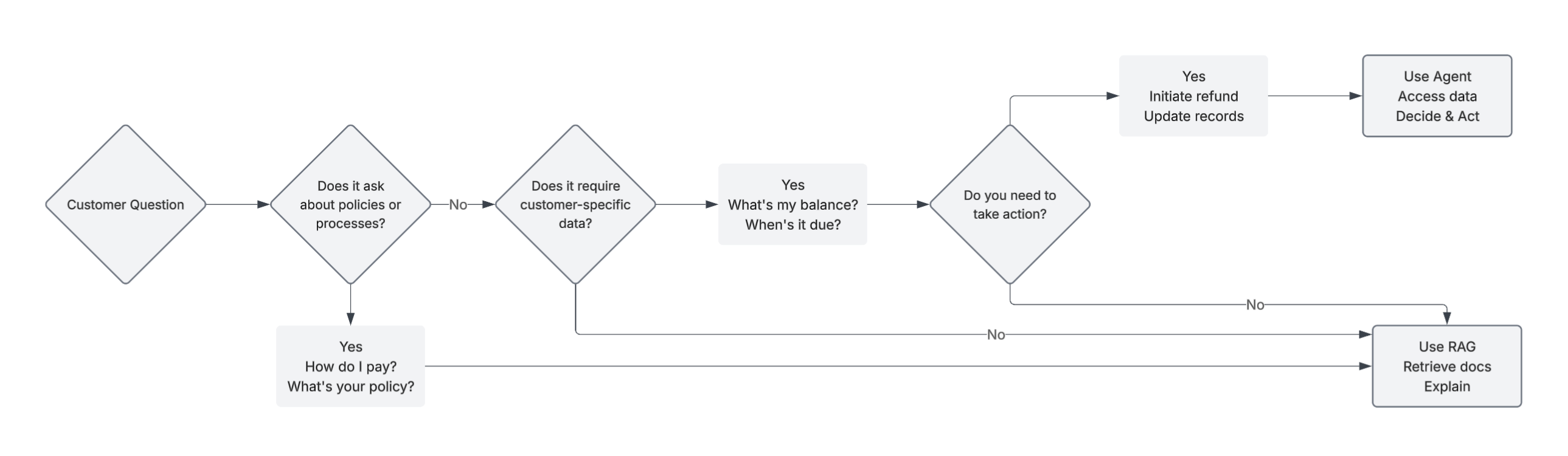
Examples where AI Agents win:
- First-contact resolution: "A customer contacts support about a billing issue. The AI agent retrieves their order details, identifies a duplicate charge, and resolves the issue or initiates a refund workflow without manual triage."
- Intelligent routing: "A customer’s issue requires a human. Instead of transferring them to a general queue, the AI agent summarizes the conversation, identifies the right team, and routes the case with full context." RAG can suggest the right team, but it cannot execute the routing or trigger the escalation.
- Self-service with authority: "A customer wants to update their delivery address. The AI agent verifies eligibility, applies the change, and confirms instantly."
- Proactive support: "The system detects a failed delivery. Instead of waiting for the customer to reach out, the AI agent notifies them, explains the issue, suggests alternatives, and reschedules the delivery."
When AI Agents are overkill:
- If the problem can be solved using policy or documentation alone ("How do I update my address?"), use RAG, or even simpler scripted (NLU/NLP-based) bots.
- If the action is always the same regardless of situation, hardcode it
- If you don't need to reason about decisions, use simple workflows
- AI Agents add complexity. Use them only when customer-specific reasoning and actions are necessary
The Hidden Costs of AI Agents
AI Agents are powerful. They're also harder than RAG.
Latency: Each loop iteration adds time. RAG is retrieve-once, then reason-once. Agents may loop multiple times.
Unpredictability: An agent might take a different path based on what it observes. This makes them harder to debug and test. RAG is more deterministic.
Risk: An agent can call APIs, modify data, trigger workflows. A mistake isn't just a bad answer. It's an action taken incorrectly. This requires careful guardrails.
Complexity: You have to design what tools the AI agent has access to, how it decides between them, what happens if a tool fails, when to give up and escalate. RAG is simpler: retrieve, then reason.
These aren't reasons to avoid agents. They're reasons to use them only when necessary.
What Makes an AI Agent System Production-Ready
If you're building an AI agent, a few things separate prototype from production:
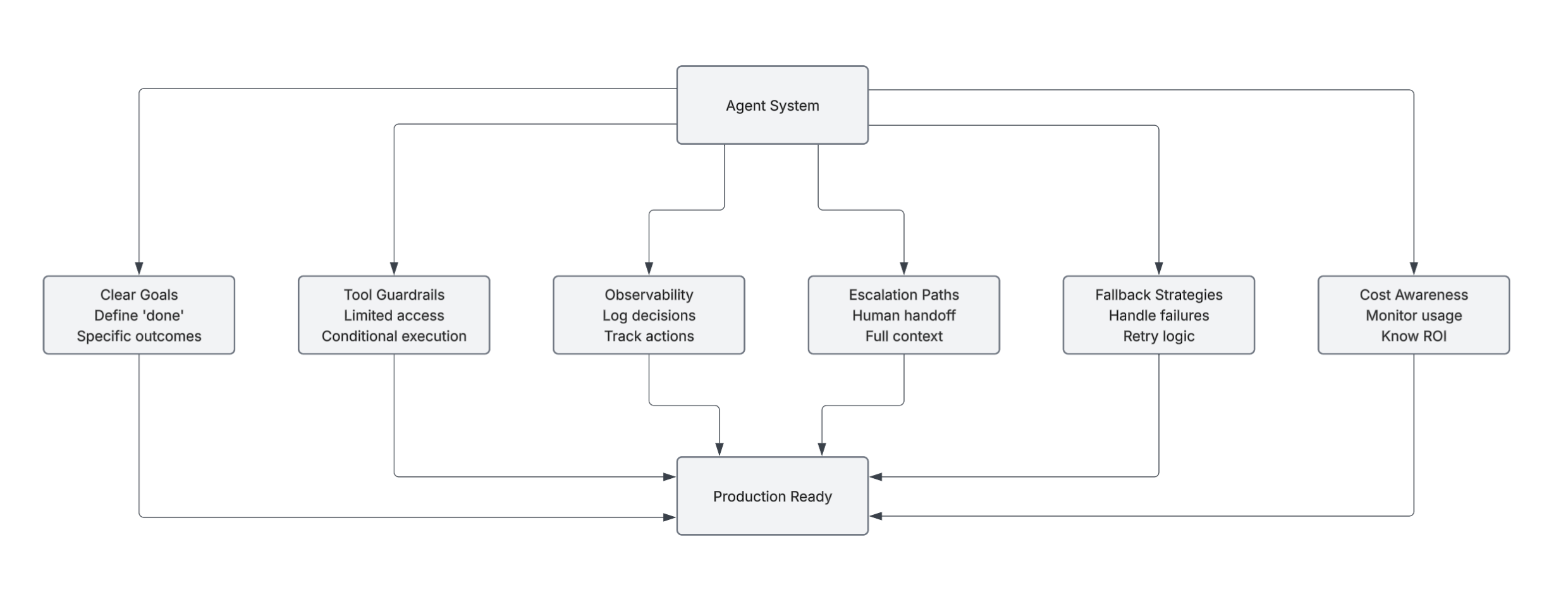
Clear goal definitions: The agent should understand what "done" means. Not vague. Specific.
Tool guardrails: The agent has access to tools (APIs, databases), but not unlimited access. Restrict what it can do and under what conditions.
Observability: Log every decision, every retrieval, every action. You need to understand what happened when things go wrong.
Escalation paths: The agent shouldn't be able to get stuck. If it can't solve the problem, it should escalate to a human with full context.
Fallback strategies: What happens if a tool fails? If retrieval returns nothing? If the model can't decide? You need paths for these.
Cost awareness: Agents loop, which means more token usage. Monitor costs aggressively. Know when an agent is more expensive than a simpler solution.
The Fundamental Shift
Once you understand AI Agents, you realize: The difference between RAG and AI Agents isn't just tools. It's decision-making authority.
RAG systems provide information. Humans (or other systems) make decisions.
AI Agent systems make decisions. They act on those decisions. They observe the results.
This is why the same foundations matter (vectors, embeddings, chunking) but the architecture is fundamentally different. RAG retrieves information. Agents decide how to use it. Or more simply: RAG makes models informed. AI Agents make them useful.
But with usefulness comes responsibility. The more autonomous the AI agent, the more carefully you have to design it.