

RAG is Maturing: From Foundations to Production Patterns
You may already know about vector databases. You might understand chunking, embeddings, and RAG. Now you're architecting, and someone says: "RAG is dying. With million-token context windows, why bother retrieving at all?"
It sounds convincing. It's wrong. And here's why.
The foundation has not changed: vectors, chunking, embeddings, and retrieval still matter. What's changed is how teams use RAG in production. Basic RAG, where you retrieve documents and pass them an to LLM, is fine for prototypes. Real systems have evolved into more sophisticated patterns that solve specific production problems.
Let's move from understanding RAG to architecting it.
The Million-Token Myth: Why Big Context Windows Don't Replace RAG
Large context windows sound like a RAG killer. Gemini, Claude, GPT, and other models now support very large prompts. Why spend engineering effort on retrieval if you can just dump everything into the LLM?
Because in production, this fails on three critical dimensions: cost, latency, and accuracy.
The Cost Problem
Every token you send to an API costs money. Processing massive context on every query, at scale, thousands of queries daily, turns your inference bill into a runaway cost.
A well-designed RAG system retrieves only the relevant documents (maybe 5-10k tokens), passes those to the LLM, and answers. Same outcome. 10x cheaper at scale.
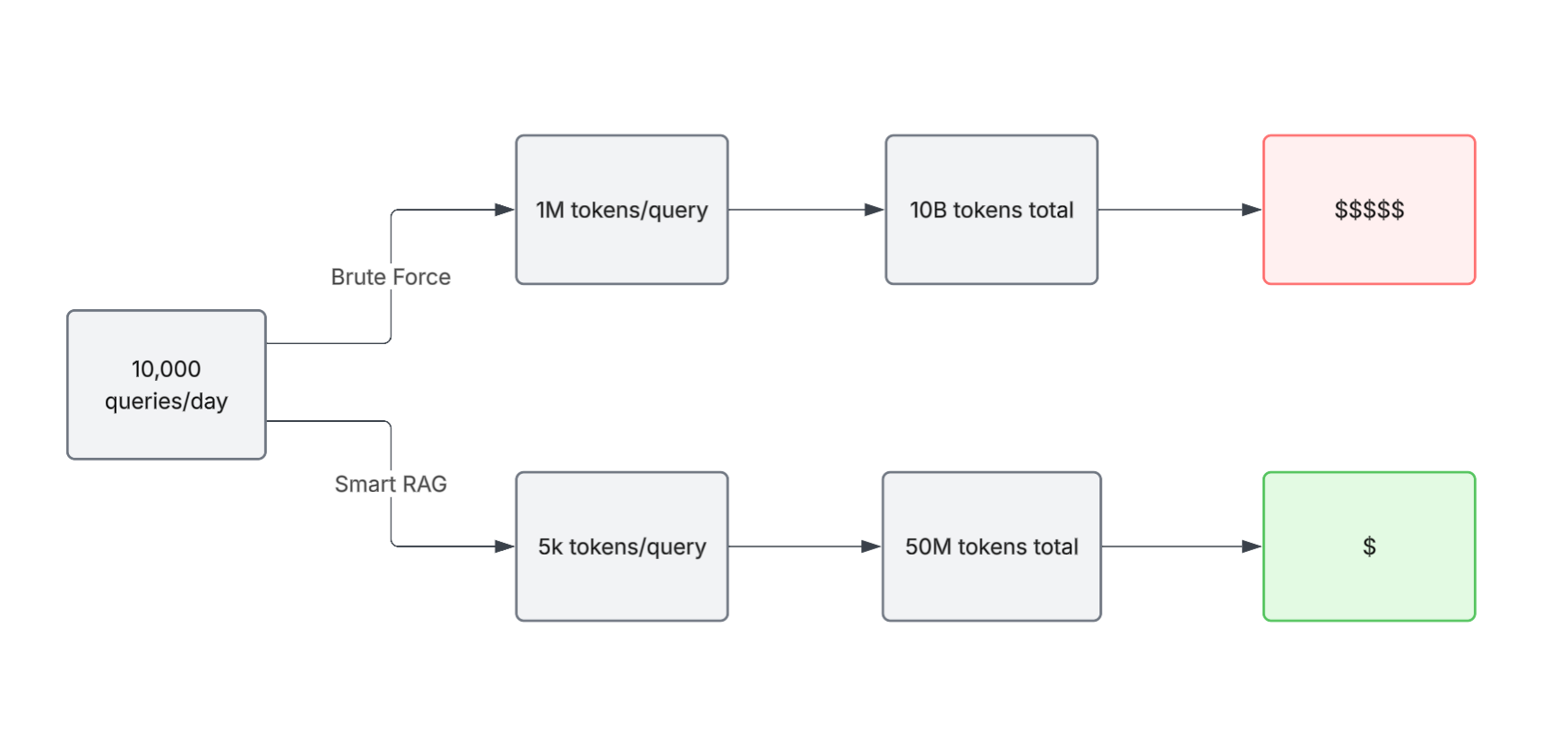
Imagine a support chatbot fielding 10,000 queries per day. With brute-force context stuffing (1M tokens per query), you're processing 10 billion tokens daily. With smart RAG (retrieving only ~5k relevant tokens), you're processing 50 million tokens.
The difference isn't marginal, it's the difference between a system you can operate and one you can't afford to.
The Latency Problem
Larger inputs mean slower responses. A query that returns in 2 seconds with focused context can take 10+ seconds when overloaded with unnecessary context. Users don't wait. They leave.
RAG keeps response times predictable because:
- Vector search is sub-second at scale
- You pass only minimum necessary context to the LLM
- The LLM spends less time processing noise
Speed often matters more than perfect accuracy in real systems. A 2-second answer users actually see beats a 10-second perfect answer they abandon.
The Accuracy Problem (The Counterintuitive One)
This is where most assumptions break: LLMs perform worse when buried in irrelevant information.
If the answer to "How much PTO do I get?" is hidden inside hundreds of thousands of tokens of unrelated documentation, the model's reasoning degrades. It's like asking someone to find a single answer in a thousand-page document where most of it is irrelevant.
In practice, models don't just read. They reason over the context they are given. Too much noise dilutes the signal.
RAG fixes this by filtering first and reasoning second. It narrows the context to what matters, so the model can focus on answering rather than searching.
The verdict: Massive context windows don't replace RAG. They raise the bar for it. They make it possible to pass richer context when needed, but intelligent retrieval remains the foundation. Without it, you're just scaling cost, latency, and noise.
RAG Patterns in Production
RAG isn't just "retrieve documents and pass them to an LLM." That version, call it vanilla RAG, works for prototypes. Production systems have evolved into structured patterns, each solving a specific problem:
- HyDE (Hypothetical Document Encoding) - Fixes phrasing mismatches
- Corrective RAG (CRAG) - Adds validation and fallback strategies
- Agentic RAG - Enables multi-step reasoning and tool use
- Graph RAG - Connects entities and relationships explicitly
Each builds on the same foundation: chunking, embeddings, and vector search. None is universally better. Each addresses a different problem.
Let's walk through them.
Pattern 1: HyDE (Hypothetical Document Encoding)
The Problem It Solves
There's often a mismatch between how questions asked and how answers are written.
For example, a user asks: "How do I request time off?"
But your HR documentation says "Employees submit PTO requests via the benefits portal using Form HR-42."
The meanings align, but the phrasing differs. In this case, the query uses everyday language ("request time off"), while the document uses formal, domain-specific terms ("PTO requests," "benefits portal," "Form HR-42").
Vector search captures semantic similarity, but it doesn't always rank the most relevant document highly. Especially when the query and document use different terminology, or when multiple similar HR documents exist.
HyDE improves this by reshaping the query into something closer to how the answer is written.
How It Works
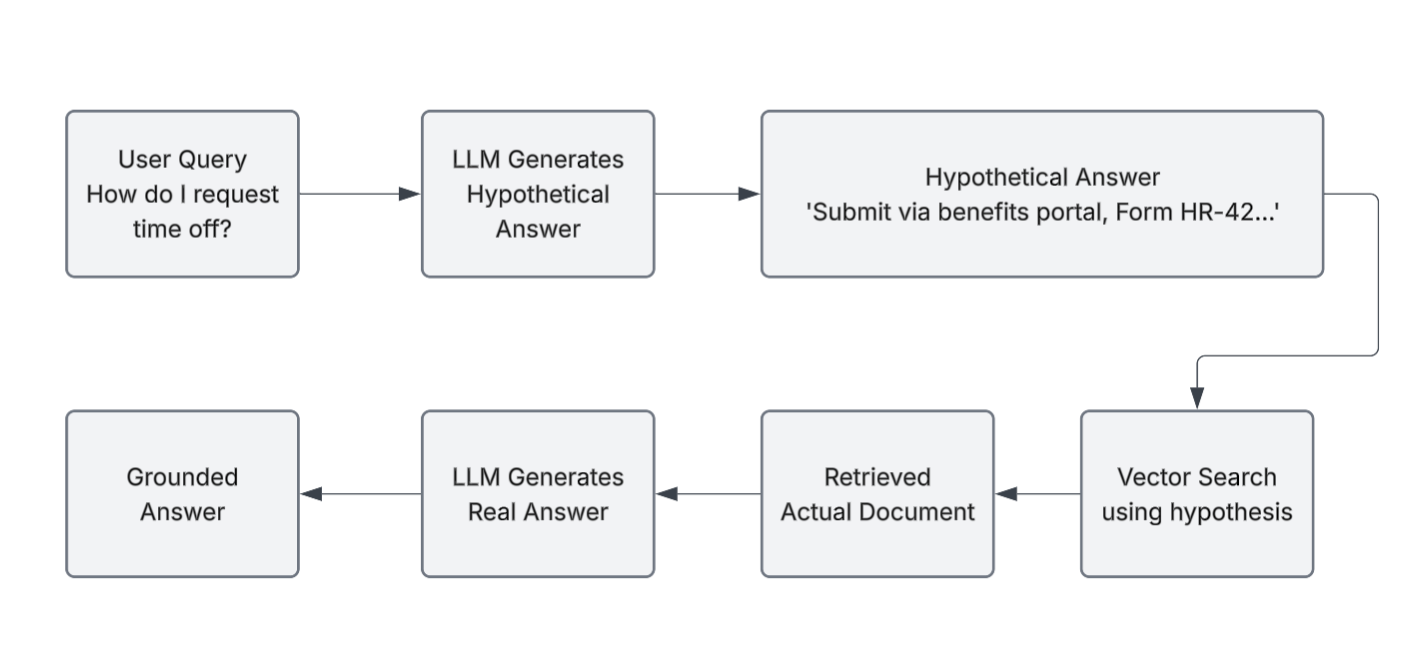
Instead of searching with the raw query, HyDE has the LLM generate a hypothetical answer first. That synthetic answer is then used to query the vector database.
It's like saying: "If someone asked this question, what would a good answer look like?" Then search for documents matching that answer. The generated answer doesn't need to be correct. It just needs to resemble how answers are written, so the system can retrieve documents that use similar language.
Flow:
- User asks: "How do I request time off?"
- LLM generates hypothetical answer
- System searches vector database using the hypothetical answer
- Retrieves relevant documents
- LLM generates real answer grounded in retrieved document
When to Use It
Use HyDE when:
- Retrieval fails due to phrasing mismatches
- Your domain has specialized terminology (legal, medical, technical)
- Your embedding model isn't fine-tuned on your domain
- Fine-tuning embeddings isn't feasible
Trade-off: HyDE adds an extra LLM call, increasing token usage. But if it improves retrieval quality, the cost is often justified.
Pattern 2: Corrective RAG (CRAG)
The Problem It Solves
Retrieval doesn't always fail obviously. It often fails silently, returning documents that look relevant but aren't. The LLM confidently hallucinates based on garbage context.
Example: A customer asks, "Why was my card declined?"
The system retrieves documents about transaction limits when the issue was actually a fraud-detection rule. The model generates a confident but incorrect answer.
Corrective RAG introduces a validation step to catch this.
How It Works
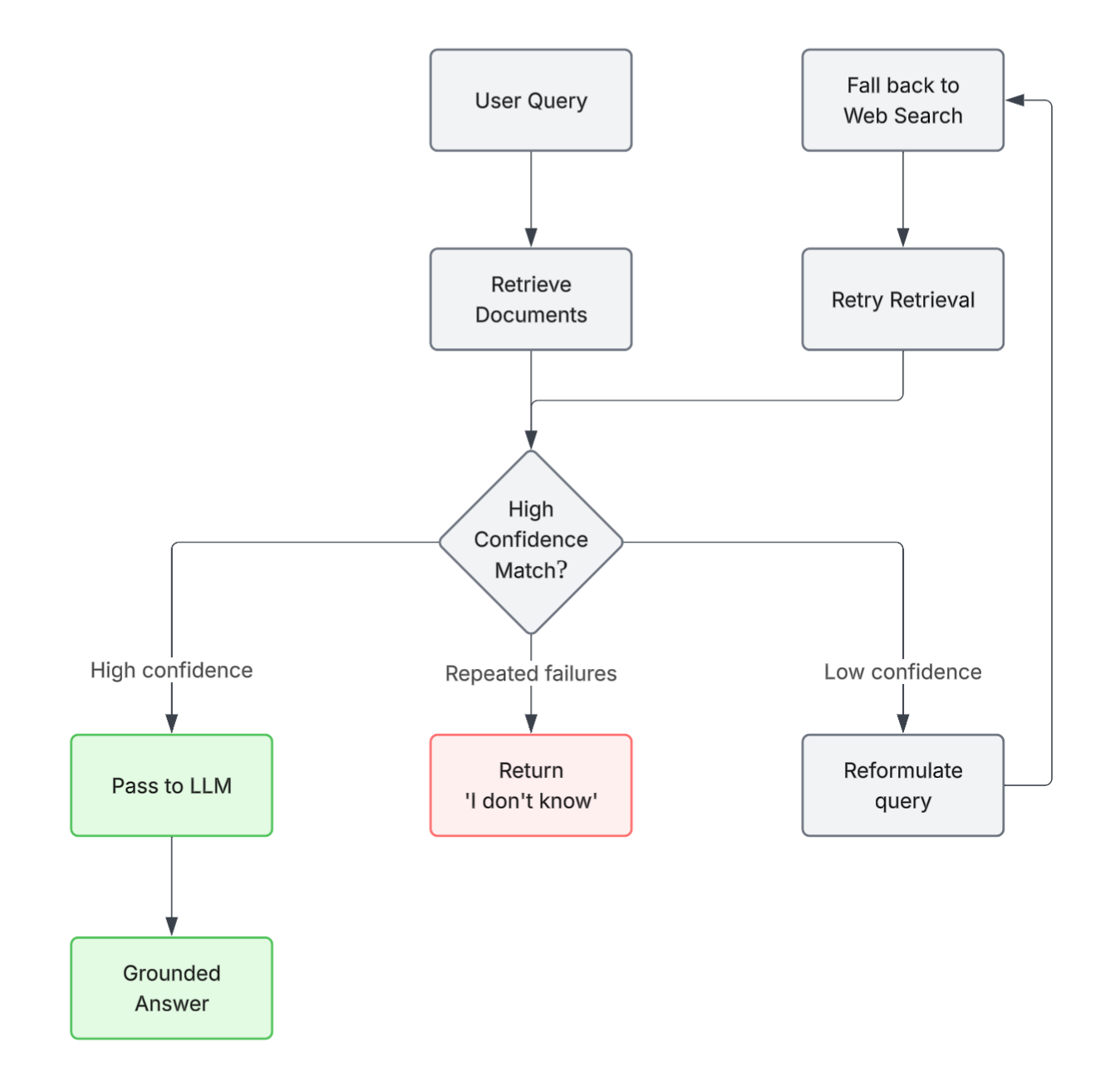
After retrieval, CRAG evaluates whether the retrieved documents actually answer the query.
If confidence is high → pass to LLM
If confidence is low → reformulate the query, retrieve again, fall back to another source (e.g. web search), or return "I don't know" rather than hallucinating.
Flow:
- Retrieve documents
- Evaluate: "Do these answer the question?"
- If yes → proceed to LLM
- If no → reformulate or retrieve from alternate sources
- LLM generates answer
When to Use It
Use CRAG when:
- Wrong answers are unacceptable (legal, medical, financial advice)
- You prioritize reliability over speed
- Your domain has many near-matches or false positives
- Users are likely to challenge incorrect responses
Trade-off: CRAG adds latency due to validation and possible retries. But it prevents silent failures. In high-stakes systems, that trade-off is always worth it.
Pattern 3: Agentic RAG
The Problem It Solves
Vanilla RAG answers one query at a time. But many real questions are multiple step:
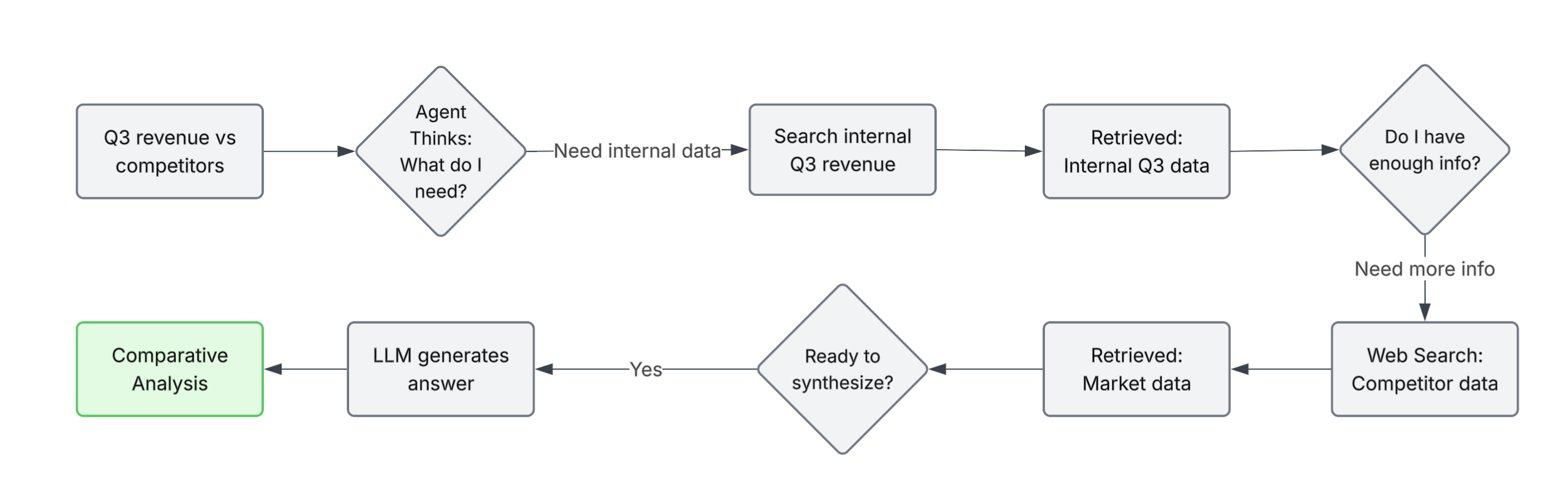
- "What was our Q3 revenue, and how does it compare to competitors?"
- "Find my recent invoices and calculate total amount due"
- "Look up customer history, check inventory, and suggest a solution"
These require combining multiple actions:
- Retrieve internal docs
- Fetch external data
- Call APIs
- Possibly run code
- Synthesize results
Agentic RAG treats the LLM as an orchestrator that decides what to do.
How It Works
The LLM acts as an agent that can:
- Query the vector database
- Search external sources (e.g. web)
- Call APIs
- Execute code
- Decide the next step based on what it has
Instead of a single pass, it works iteratively:
Flow:
- User asks a complex question
- Agent identifies required steps
- Executes actions (retrieve, search, call APIs)
- Evaluates: "Do I have enough information?"
- Repeats if needed
- Synthesizes a final answer
When to Use It
Use Agentic RAG when:
- Questions require multiple data sources
- You need API or tool integrations
- The system must decide dynamically what to do next
- Problems are inherently multi-step
Trade-off: Agentic RAG is more complex to design, build and debug. Each additional step adds latency. But it's the only pattern that reliably handles multi-step queries.
Pattern 4: Graph RAG
The Problem It Solves
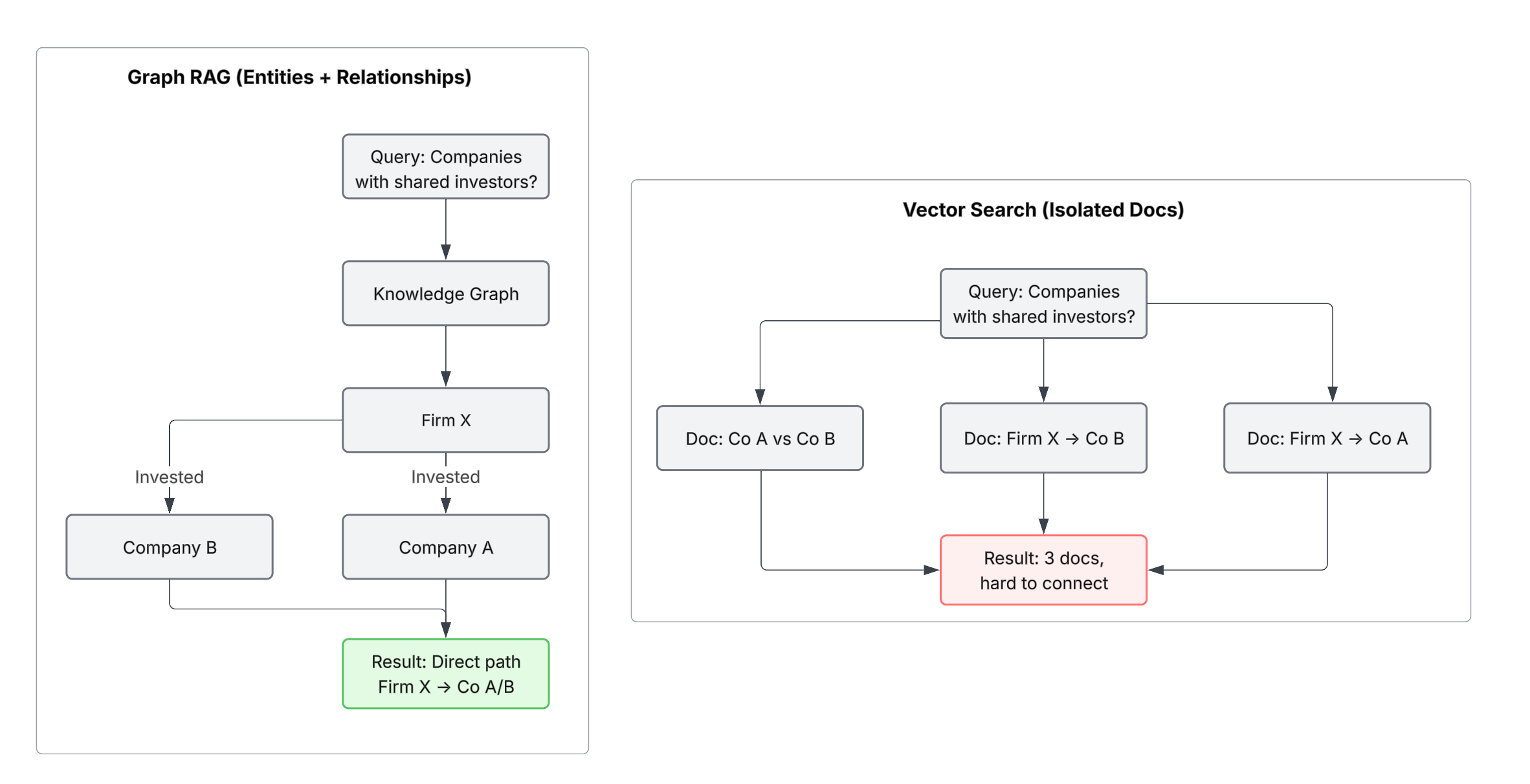
Vector search works great for matching meaning. But it struggles when answering questions that depend on relationships between entities.
Example: You're researching an organization. You find:
- "Company A received $10M investment from Firm X"
- "Firm X also invested in Company B"
- "Company B and Company A are competitors"
A question like "Which companies share the same investors as Company A?" requires connecting these facts. Vector search retrieves documents independently, but doesn't explicitly connect them.
Graph RAG builds this explicitly.
How It Works
Instead of treating documents as isolated chunks, Graph RAG builds a knowledge of entities and relationships:
- Entities: Company A, Firm X, Company B, investment, investor
- Relationships: "Firm X invested in Company A", "Firm X invested in Company B"
Queries that require connections can then traverse the graph, rather than relying on implicit matching.
When to Use It
Use Graph RAG when:
- Your domain is relationship-heavy (organizations, networks, hierarchies)
- Questions require connecting multiple pieces of information
- You need structured understanding, not just retrieval
- You are building knowledge or intelligence systems
Examples:
- Company or investor mapping
- Academic research (citations, collaborations)
- Organizational structures
- Connection-based recommendations
Trade-off: Graph RAG requires upfront effort to build the graph (entity extraction, relationship mapping). But for relationship-heavy queries, it dramatically outperforms basic vector search because the relationships are explicit rather than implicit.
When to Use Each Pattern: A Decision Framework
Start with Vanilla RAG if you're prototyping or building Q&A over static documents. It's simple, effective, and covers most use cases.
Add HyDE if retrieval struggles due to phrasing mismatches. The extra cost is usually worth the improvement in retrieval quality.
Add Corrective RAG if you can't afford wrong answers. In legal, medical, or financial domains, reliability matters more than latency.
Use Agentic RAG if queries are multi-step and require multiple sources. Think customer support workflows, research, or complex analysis.
Use Graph RAG if your domain is relationship-heavy. Organizational knowledge, research systems, and recommendation engines benefit most.
What Good RAG Design Looks Like
Strong RAG systems aren't defined by the tools they use, but by how well the tradeoffs are understood.
Understand the tradeoffs: Vanilla, HyDE, CRAG, Agentic, and Graph each solve different problems.
Know why context windows don't replace RAG: Cost, latency, and accuracy degrade without selective retrieval.
Understand the progression: Foundations (vectors, chunking, embeddings) → patterns (HyDE, CRAG, Agentic, Graph).
Know when to apply each pattern:
- Phrasing mismatch → HyDE
- High-stakes → CRAG
- Multi-step → Agentic
- Relationships → Graph
Know the tradeoffs:
- HyDE → higher token usage
- CRAG → added latency
- Agentic → increased complexity
- Graph → upfront modeling effort
Final Thought
Once you understand this, RAG stops being a single technique and becomes a philosophy: make retrieval precise so reasoning can stay focused.
The foundation (chunking, embeddings, vector databases) is essential. The patterns (HyDE, Corrective, Agentic, Graph) are what make systems production-ready.
Get the foundation right. Apply the right pattern. That's how you move from prototypes to real systems.