

The Secret Engine Behind Modern AI: Vector Databases Explained
You built a RAG system. It seemed like it should work. You fed it all your documents, connected it to an LLM, and watched it… hallucinate confidently about things it should know.
The problem isn't your LLM. It's not your prompt. It's your vector database, or more specifically, what you're asking it to do.
Most teams get vector databases wrong in ways that silently destroy retrieval quality. And they never figure out why.
But here's the thing: once you understand how this layer actually works, everything changes. Your RAG system goes from fragile to reliable. And you finally understand why so many AI implementations fail in production.
The Problem with Traditional Databases
Imagine building an AI assistant to answer employee questions using thousands of internal company documents, like HR policies and product manuals etc. Your first instinct might be to store everything in a traditional database like MySQL or Postgres. That's where things break immediately
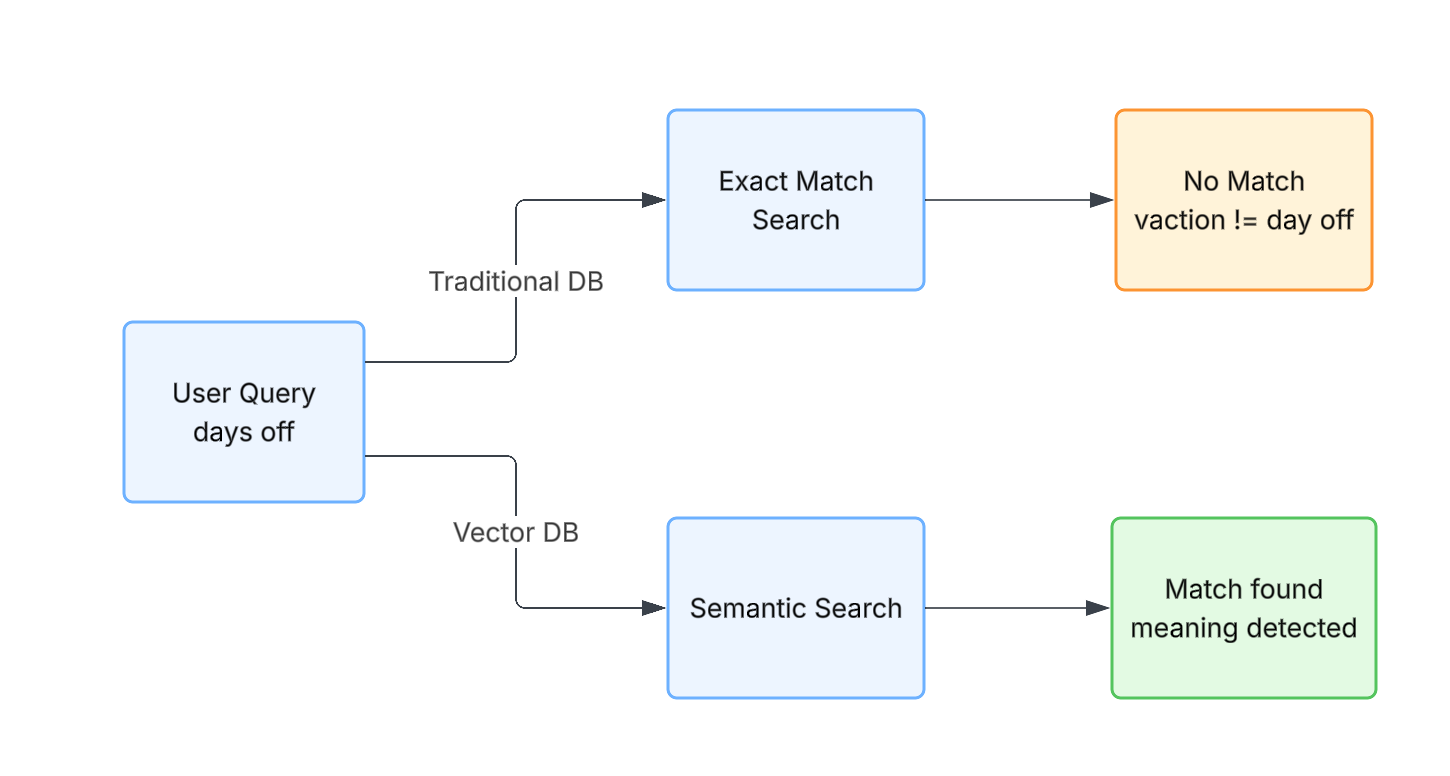
Traditional databases are designed for exact or partial text matching.
So when someone asks, "How many days off do I get per year?"… but your HR policy only uses the word "vacation," the system fails. To a traditional database, those are unrelated terms. There is no concept of meaning.
Enter Vectors: Meaning-Based Matching
Vector databases solve this exact problem. Instead of storing
raw text, machine learning models convert data such as words,
sentences, even images into embeddings (numerical
representations).
These embeddings live in a
mathematical space where:
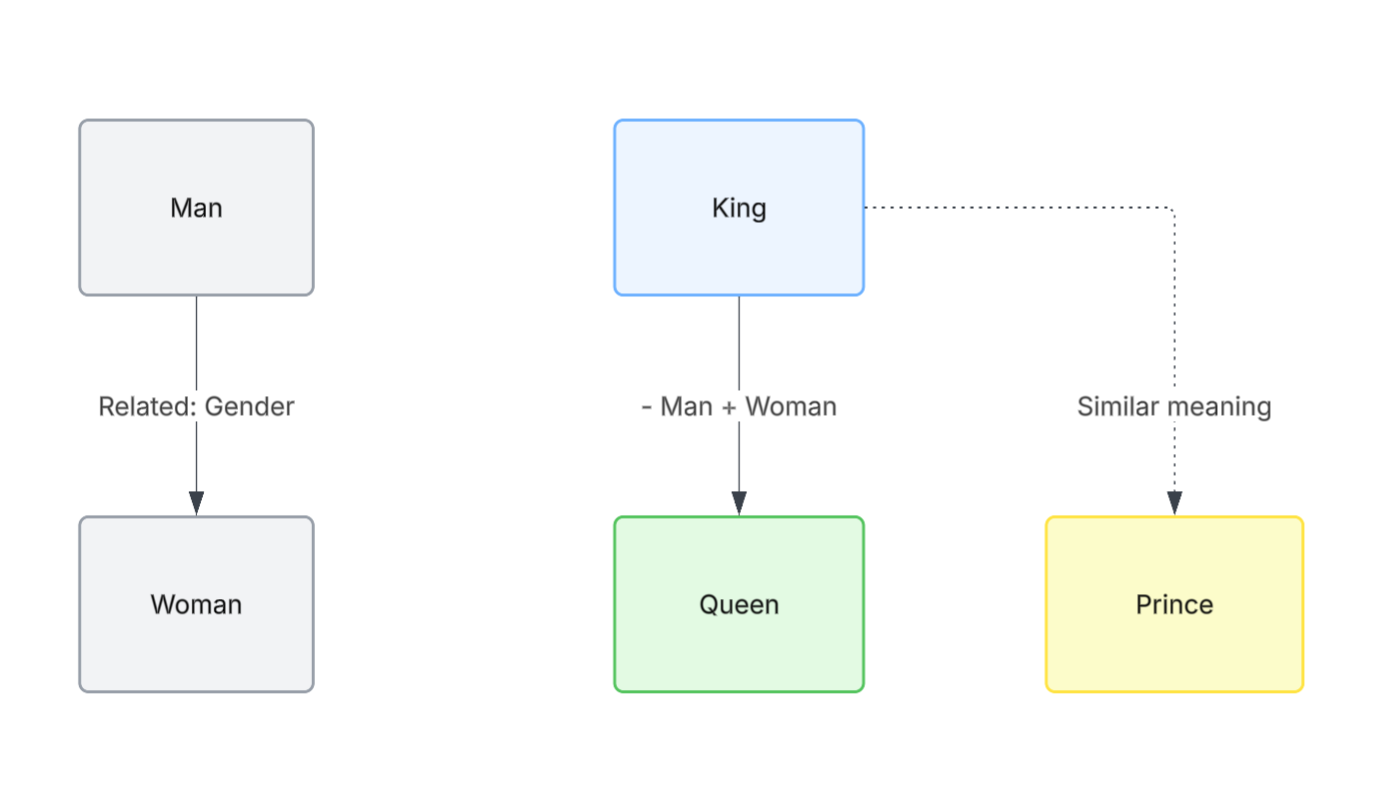
- Similar meanings are closer together
- Different meanings are far apart
A classic example is this: if you take the concept of "king," remove "man," and add "woman," you end up very close to "queen." (read more)
This isn't a trick. It's the model learning that meaning has structure.
Now when a user asks about "days off", the system::
- Converts the query into a vector
- Searches for nearby vectors
- Retrieves documents about "vacation"
Even if the exact words never match.
The Magic of RAG (Retrieval-Augmented Generation)
This is where everything comes together.
A standard LLM is like a student taking a closed-book exam. It
can only answer based on what it memorized during training.
RAG
turns this into an open-book exam
- The LLM is the reasoning engine.
- The vector database is the textbook.
When a query comes in:
- The system retrieves the most relevant documents (via vector search)
- Passes them to the LLM
- The LLM generates an answer grounded in real data.
This is how you reduce hallucinations, use private/internal knowledge and stay up-to-date beyond training data.

Where Things Get Real in Production
This isn't just about 'finding similar text'. In real systems, it becomes a balancing act between:
- Retrieval accuracy (getting the right context)
- Latency (responding fast enough)
- Cost (token usage + compute)
Poor embeddings or bad chunking don't just hurt quality. They directly increase token usage and slow down responses while degrading user trust. This is where most RAG implementations quietly fail.
The Hidden Cost of Getting It Wrong
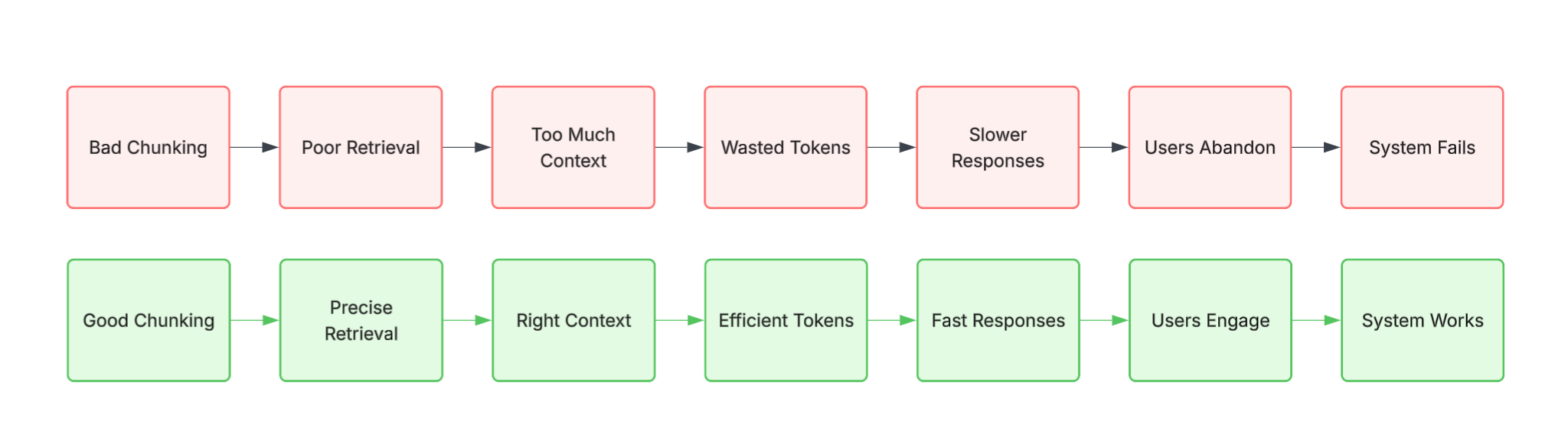
Let's make this concrete. A poorly chunked RAG system doesn't just return irrelevant results, it cascades:
Bad chunking → Poor retrieval → Too much context → Wasted tokens → Slower responses → Users lose trust → System gets abandoned
Imagine you're building a customer support chatbot. With bad chunking, your system retrieves 10 irrelevant documents when it only needed 2 relevant ones. Each extra document is wasted tokens. At scale, thousands of queries daily, this compounds. Your API costs balloon. Response times creep up to 5-10 seconds instead of 2 seconds. Users give up and call support anyway. You've built an expensive system that increases work.
Now imagine the inverse: properly chunked documents, semantic search working as intended. Retrieval is precise. You pass only the necessary context to the LLM. Same 1,000 queries cost 60% less. Responses come back in 2 seconds. Users actually use it.
If You Get One Thing Right: Chunking
If you get only one thing right in RAG, get this right. How you split documents before embedding them matters as much as the model itself.
If it is too large, you lose precision. If they are too small, you lose context.
A strong starting point:
- 300–500 tokens per chunk
- 50–100 token overlap
- Use semantic chunking where possible
This directly impacts retrieval quality, and everything downstream.
Example: What Chunking Looks Like in Practice
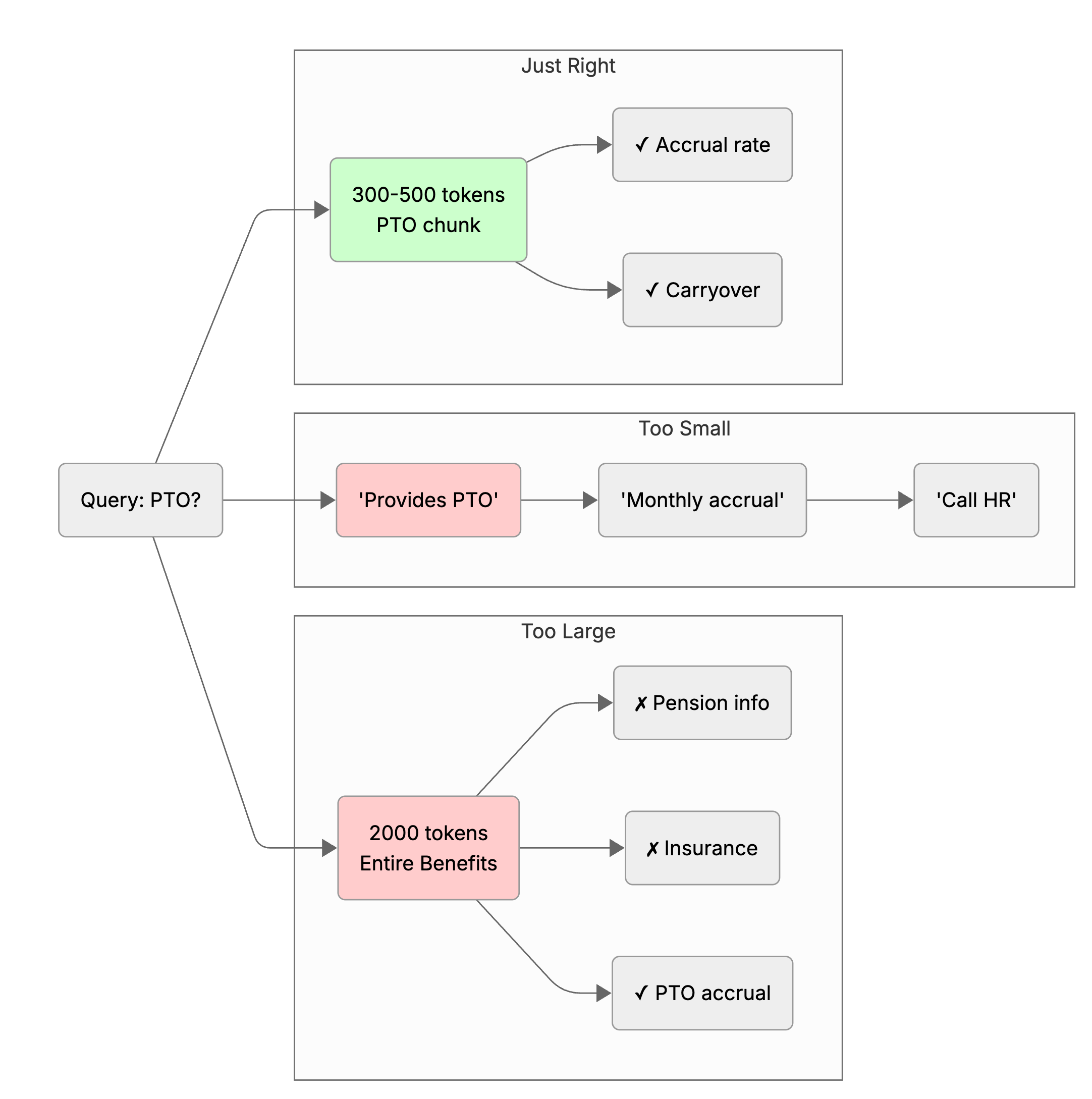
Let's say you're indexing an employee handbook. Here's what goes wrong at the extremes:
Bad chunking (too large): You split the handbook into 3 sections (Onboarding, Benefits, Policies). When someone asks "How much PTO do I get?" the system retrieves the entire 2,000-token Benefits section. The LLM has to wade through pension info, retirement-plan matching, insurance details before it finds the answer. Wasted tokens, wasted time.
Bad chunking (too small): You split every sentence. "How much PTO do I get?" retrieves fragments: "The company provides PTO." "PTO accrual is monthly." "Contact HR for specifics." Pieces don't add up. The LLM has no context about accrual rates, company policy, exceptions. Result: hallucination or a useless answer.
Good chunking (300-500 tokens): The PTO section becomes 3-4 well-structured chunks: one covering accrual rates, one covering carryover policy, one covering exceptions. Query retrieves the accrual chunk. LLM gets enough context to answer accurately, with no fluff. Clean.
Choosing Your Vector Database
Don't overthink this, but don't treat them as interchangeable either.
- Chroma - best for local prototyping, zero setup
- Qdrant - high performance, open-source, full control
- Pinecone - fully managed, scales without operational overhead
- Weaviate - ideal when hybrid search (keyword + vector) is required
Pick based on operating model, not hype.
Vectors are Everywhere
Vector databases aren't just for text-based RAG. The pattern shows up everywhere:
Spotify's Discover Weekly uses vectors to understand your taste (based on songs you've listened to, artists you follow, genres you explore). It finds songs that cluster near your taste profile and recommends them. Not keyword matching, meaning matching.
Netflix's recommendation engine works the same way. A movie isn't defined by its title or genre tags. It's defined by a vector: tone, pacing, character dynamics, narrative structure. Your viewing history defines another vector. Netflix finds films that sit close to your taste in that space.
Pinterest's visual search converts images into vectors and finds visually similar pins. You take a photo of a living room and Pinterest retrieves furniture pins that match the vibe - color, style, layout, not the exact objects.
Cybersecurity anomaly detection operates on the same principle: normal network traffic patterns cluster together in a vector space. An employee suddenly logging in at 3 AM from a new country and downloading sensitive data, that behavior falls far outside the normal cluster. Instantly flagged as suspicious.
In every case, the insight is the same: meaning has structure in vector space. The tools differ (music, video, images, traffic logs), but the underlying principle is identical.
So What Should You Do With This?
If you're building or thinking about building a RAG system, start here:
- Don't chase the shiniest vector database. Chroma works great for prototyping. Qdrant or Pinecone work great for production. Pick based on your constraints, not the startup news.
- Obsess over chunking first. Before optimizing your embeddings or your LLM, get chunking right. This single decision ripples through everything downstream: retrieval quality, latency, cost.
- Test your retrieval independently. Before connecting your RAG to an LLM, validate that vector search is actually returning relevant documents. Most teams skip this and wonder why the final output is bad.
- Measure the actual impact. Not just retrieval accuracy (which you can game), but end-to-end metrics: how many queries do users rephrase? How many do they abandon? How fast are responses? These tell you if your system actually works.
Final Thought
Once you understand this, 'AI' stops looking like magic. It becomes a system: embeddings → retrieval → reasoning. And the difference between a demo and a production-grade AI application is almost always how well this layer is designed.
The infrastructure you choose, the documents you index, the way you chunk them, these aren't afterthoughts. They're the foundation. Get them right, and everything else works. Get them wrong, and no amount of prompt engineering will save you.
See It in Action
Want to see these concepts in practice? Check out this simple RAG system implementation that demonstrates the core principles discussed here: document chunking, vector embeddings, semantic search, and LLM integration. It's a hands-on starting point for building your first production-ready RAG system.