
Part 3: Smarter Decisions & Structured Data
Go beyond one-shot commands, build dynamic CX logic with loops, structured data, and smart decision-making using dictionaries, tuples, and sets.
In Part 2, we got comfortable with if/else decisions,
type conversions, list slicing, and simulating real-world routing
logic using Python. But now we’re stepping into territory that
really matters when you’re working on interactive systems and
customer data: loops that repeat until something is right,
structures to store named values, and containers that ensure
uniqueness or enforce immutability (refers to the state of an
object or value where its data cannot be changed after it has been
created).
Whether you’re building contact flows, pricing tools, or routing logic, this is where Python starts feeling real.
The embedded code editor below works great for trying things out. Just type, run, and experiment. And if you're using your own local setup or something like Replit, you’re good too.
- Click the hamburger menu (top-left) to open the sidebar. And you can do the following:
- Reset to start fresh anytime.
- Download to save your code. You can also download the code as a zip file.
- Fullscreen mode = more space! Press Esc to exit.
Where We Left Off, And Why This Next Step Matters
Last time, we organized data with lists, automated tasks using
for loops, and sharpened our logic with
if/elif/else, all grounded in real use cases.
What if you're building a contact center dashboard and need to
keep track of
named data like customer_id,
status, preferred_language? Or you're
creating an AI-powered WhatsApp bot that needs to keep asking
questions until the right response is received?
Or maybe you want to ensure that the same phone number doesn’t
enter your callback queue twice?
That’s what Part 3 is about. We're moving from linear thinking to structured logic:
-
whileloops — when you want to repeat something until the condition is met. - Dictionaries — for storing and retrieving named data, like contact profiles or configuration settings.
- Tuples — when your data shouldn't change after creation.
- Sets — when you want uniqueness and fast lookups.
while Loops, Repeat Until It’s Right
Sometimes, you don’t know in advance how many times you’ll need
to repeat an action. That’s where while loops
shine. Unlike for loops (which run a set number of
times), while loops keep running
as long as a condition is true.
Think of a bot asking for an email address, it should keep
prompting the user until it gets a valid one. Or an IVR system
that repeats “Please press 1 to confirm” until it receives input
that’s classic while logic. If you added a limit,
like cutting off after 3 failed tries, you'd start thinking more
in for loop terms.
Basic Syntax
while condition:
    # Do something
    # Update or check condition
IndentationError. We touched on this
in Part 1, but it's even more important when working with loops.
Example: Get a Valid Input
Here’s a fun and simple use of a while loop: we
want the user to guess a specific number, let’s say
7. The script will keep asking them to guess until
they get it right. This mirrors real-world input validation
patterns, like asking for a confirmation, a correct PIN, or
valid account info in a loop until it meets the required format
or value.
user_input = ""

while user_input != "7":
    user_input = input("Guess the lucky number (1-10): ")

print("You got it!")
Guess the lucky number (1-10): 3
Guess the lucky number (1-10): 9
Guess the lucky number (1-10): 7
You got it!
Tip: Always make sure the condition inside
your while loop eventually changes, otherwise,
you'll create an infinite loop that never
ends.
For example, if you forgot to update
user_input inside the loop, like this:
user_input = ""

while user_input != "7":
    print("Guess the lucky number!")
The script would just keep printing the message forever,
because the value of user_input never changes —
the loop condition user_input != "7" is always
True.
Always double-check: is your loop condition being updated inside the block? That’s the key to writing smart, safe loops.
Breaking Out Early with break
Sometimes, you want to keep looping forever until a
specific action happens, like a user typing a command to exit.
In these cases, we often use while True to create
an “infinite” loop and then use break to exit when
needed:
while True:
    command = input("Type 'quit' to exit: ")
    if command == "quit":
        print("Session ended.")
        break
This is useful for building interactive scripts, like a simple command-line bot or a menu that listens for input and only exits when told to.
Skipping with continue
Use continue when you want to
skip certain inputs or conditions
but still keep looping through the rest. For example, in a
contact center script that processes ticket IDs, you may want to
ignore empty or invalid ones:
ticket_ids = ["A123", "", "B456", " ", "C789"]

for ticket in ticket_ids:
    if ticket.strip() == "":
        continue  # Skip empty or blank ticket IDs
    print(f"Processing ticket: {ticket}")
Processing ticket: A123
Processing ticket: B456
Processing ticket: C789
continue skips over the current loop iteration and
moves to the next item. It’s useful when you want to cleanly
filter out noise while still processing the rest.
Your Turn:
- Build a basic IVR-style loop: Ask the user to press "1" for support, "2" for sales, or "9" to exit. Keep looping until they press "9".
-
Create a menu loop that lets a user type commands like
status,help, orquit, and responds accordingly.
Dictionaries — Structured, Named Data
In the real world, data is rarely just a flat list. Think about a customer profile: name, ID, tier, language preference, and last interaction time. Lists can’t do that well. That’s where dictionaries come in, Python’s built-in way to store named values.
A dictionary is an unordered collection of key-value pairs. Think of it like a contact card, a JSON API payload, or a settings menu in your bot framework.
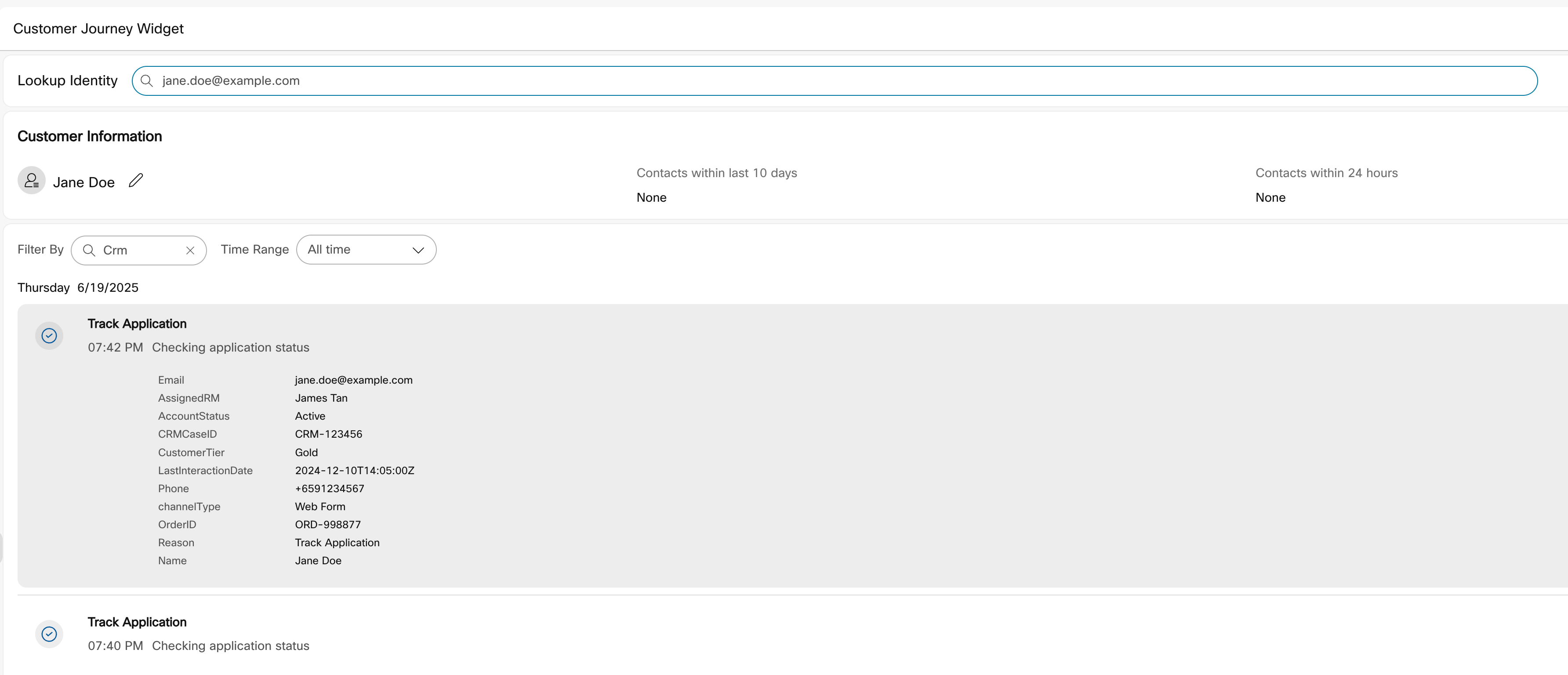
Think of how customer data is represented in the Webex Contact Center’s Customer Journey widget, which is powered by Journey Data Service (CJDS). Each record shows structured information, like email, assigned RM, account status, order ID, and more, all neatly paired with labels. Behind the scenes, that’s essentially a dictionary: key-value pairs describing one entity.
Creating a Dictionary
In Python, you can store all of that structured customer info in a dictionary, just like how it appears in the CJDS-powered widget. Here’s how that looks:
customer = {
    "name": "Jane Doe",
    "email": "[email protected]",
    "assigned_rm": "James Tan",
    "account_status": "Active",
    "crm_case_id": "CRM-123456",
    "tier": "Gold",
    "last_interaction": "2024-12-10T14:05:00Z",
    "phone": "+6591234567",
    "channel": "Web Form",
    "order_id": "ORD-998877",
    "reason": "Track Application"
}
Accessing Values
You can use square brackets to access specific pieces of information about the customer:
customer = {
    "name": "Jane Doe",
    "email": "[email protected]",
    "assigned_rm": "James Tan",
    "account_status": "Active",
    "crm_case_id": "CRM-123456",
    "tier": "Gold",
    "last_interaction": "2024-12-10T14:05:00Z",
    "phone": "+6591234567",
    "channel": "Web Form",
    "order_id": "ORD-998877",
    "reason": "Track Application"
}

print(customer["name"])
print(customer["tier"])
print(customer["order_id"])
print(customer.get("foo"))                     # Safe: returns None
print(customer.get("foo", "Not available"))    # Safe: returns fallback
Jane Doe
Gold
ORD-998877
None
Not available
Heads up: If you try
customer["foo"] (with square brackets) on a
missing key, Python will raise a KeyError and
stop your program. But .get() is safer, it
returns None or a fallback value if provided.
# This will crash:
print(customer["foo"])
KeyError: 'foo'Adding or Updating Keys
You can add new fields or update existing ones in a dictionary using the same square bracket syntax.
customer["status"] = "active"       # Add a new field
customer["tier"] = "platinum"       # Update existing field
Think of this like enriching a live customer profile during a support session. You might upgrade their tier after an escalation, or flag a new status after the interaction ends.
Looping Through a Dictionary
Let’s loop through all the fields in a customer profile and print out each key-value pair. This is useful when you want to summarize a record, say, before handing off a customer to a live agent or syncing data to a CRM.
customer = {
    "name": "Jordan",
    "id": "C1044",
    "tier": "platinum",
    "language": "en",
    "last_interaction": "2024-02-01 10:22",
    "status": "active"
}

for key in customer:
    print(key, "→", customer[key])

print("\nField Names:", list(customer.keys()))
print("Field Values:", list(customer.values()))
print("All Items:", list(customer.items()))
print("Field Count:", len(customer))
name → Jordan
id → C1044
tier → platinum
language → en
last_interaction → 2024-02-01 10:22
status → active

Field Names: ['name', 'id', 'tier', 'language', 'last_interaction', 'status']
Field Values: ['Jordan', 'C1044', 'platinum', 'en', '2024-02-01 10:22', 'active']
All Items: [('name', 'Jordan'), ('id', 'C1044'), ('tier', 'platinum'), ('language', 'en'), ('last_interaction', '2024-02-01 10:22'), ('status', 'active')]
Field Count: 6
list() around
.keys(), .values(), and
.items() to see the results clearly. These methods
return special views that behave like sets, converting them to
lists makes them easier to print and debug.
Common Use Cases in CX
- Customer Profiles: name, tier, contact history, product usage
- Bot Memory: last question asked, current form state, prior intents
- Config & Settings: language, fallback strategy, timezone, routing path
Your Turn:
-
Create a dictionary for a mock customer or lead, include
keys like
name,email,status, andpreferred_channel. - Print their name and last interaction date.
-
Update their
statusfield and add a new key likecampaign_source. -
Loop through the dictionary and print each field clearly
(like
field: value).
Tuples — Locked & Ordered
Tuples are like lists, but with one major difference: they cannot be changed after they’re created. That means no adding, removing, or updating. Once it’s set, it stays.
Why use something that can’t change? Because in some real-world
use cases, you often need data integrity.
Imagine storing a (customer_id, signup_date) pair —
that shouldn’t change later in the flow. Tuples let you lock
that structure in.
Creating Tuples
customer_identity = ("C1044", "2024-02-01")
This tuple holds a fixed set:
(customer_id, registration_date). Perfect for
keeping customer records stable across systems.
Accessing Elements
Tuples use the same indexing rules as lists:
print(customer_identity[0])  # C1044
print(customer_identity[1])  # 2024-02-01
C1044
2024-02-01You can even slice a tuple (though the result is still a tuple):
print(customer_identity[:1]) # ('C1044',)customer_identity[0] returns the first item
directly, just the string "C1044". But
customer_identity[:1] returns a
new tuple containing only the first item:
('C1044',). The comma is what makes it a tuple.
Trying to Modify a Tuple
customer_identity[0] = "C2000" # This will breakTypeError: 'tuple' object does not support item assignment(agent_id, location), or
(status_code, error_message).
Immutable safety: Useful for sharing config or record snapshots between systems, especially when you want to prevent changes.
Your Turn:
-
Create a tuple representing
(agent_id, login_time). - Slice it, access individual values, and print them.
- Try changing one of the values, see what error you get.
Sets — Keep It Unique
Sets in Python are like dynamic guest lists, they only keep unique values and don't care about order.
They’re perfect for:
- Tracking unique customer IDs that contacted support today
- Listing unique tags from feedback or interactions
- Quickly checking if a value (like an agent ID) exists
Creating Sets
callers_today = {"C1044", "C1045", "C1044", "C1071"}{'C1044', 'C1045', 'C1071'}
Notice how the duplicate "C1044" is removed? That’s
the power of sets: automatic de-duplication.
Adding & Removing Items
callers_today.add("C1080")
callers_today.remove("C1071")
Use .add() to include new items, and
.remove() to kick someone out.
Fast Membership Testing
if "C1080" in callers_today:
print("Returning caller detected.")How Big Is Your Set?
print(len(callers_today))3
Use len() just like with lists or dictionaries to
count the number of unique items.
Full Example: Tracking Unique Callers
# Initial set with some duplicates
callers_today = {"C1044", "C1045", "C1044", "C1071"}

# Add a new caller
callers_today.add("C1080")

# Remove a caller
callers_today.remove("C1071")

# Check if a caller exists
if "C1080" in callers_today:
    print("Returning caller detected.")

# Print the full set
print(callers_today)

# Count how many unique callers
print("Total unique callers:", len(callers_today))
Returning caller detected.
{'C1045', 'C1080', 'C1044'}
Total unique callers: 3
Notice how the duplicate "C1044" was automatically
removed? That’s the power of sets:
automatic de-duplication and lightning-fast
in checks.
Common CX Use Cases
- Unique feedback tags from multiple customers
- Deduplicating IDs before saving to a database
- Checking membership in real-time for VIPs or blocked users
Your Turn:
-
Create a set of agent skills like
{"billing", "tech", "sales", "tech"}. - Observe what happens to the duplicate.
-
Add a new skill and check if
"billing"exists usingin.
Mini Project – CX Profile Engine
Let’s build something practical, a mini CX dashboard that tracks customer profiles, manages agent skills, and runs in a loop until the user decides to exit.
You’ll use:
- Dictionaries to store customer profiles
- Tuples to store fixed info like registration date
- Sets to manage unique tags
- While loops to keep the interface active
Example Output
--- CX Profile Engine ---
1. Add Customer
2. View All Customers
3. Exit

Choose an option: 1
Enter customer ID: C1044
Enter name: Alice
Enter status: Active
Customer added!

Choose an option: 2

--- All Customers ---
C1044 | Alice | Active | Tags: set()
  Registered on: 2025-07-03
The Code
# CX Profile Engine

# We import just the datetime class from the datetime module
# (You could also do: import datetime and then use datetime.datetime.now())
from datetime import datetime

customers = {}

while True:
    print("\n--- CX Profile Engine ---")
    print("1. Add Customer")
    print("2. View All Customers")
    print("3. Exit")

    choice = input("Choose an option: ").strip()

    if choice == "1":
        cid = input("Enter customer ID: ").strip()
        name = input("Enter name: ").strip()
        status = input("Enter status: ").strip()
        registered_on = datetime.now().strftime("%Y-%m-%d")
        profile = {
            "name": name,
            "status": status,
            "tags": set(),
            "meta": (cid, registered_on)
        }
        customers[cid] = profile
        print("Customer added!")

    elif choice == "2":
        if not customers:
            print("No customers yet.")
        else:
            print("\n--- All Customers ---")
            for cid, data in customers.items():
                print(f"{cid} | {data['name']} | {data['status']} | Tags: {data['tags']}")
                # Uncomment below to display registration date:
                # print(f"  Registered on: {data['meta'][1]}")

    elif choice == "3":
        print("Goodbye!")
        break

    else:
        print("Invalid option. Please try again.")
Want to Extend It?
-
Ask users to enter tags for each customer (e.g.,
"billing","complaint") - Filter and show only active customers
- Let users remove a customer by ID
- Display the registration date for each customer
- Track total customer count and number of unique tags
.add() to store it in their
tags set.
Other Concepts You’ll Start Noticing
As you code more, small but powerful ideas will naturally show up in your work. You don’t need to master them right away, just be aware of them when they appear.
| Concept | Description & Example |
|---|---|
continue |
Skips the rest of the current loop and jumps to the next
iteration. Example: |
| Immutable dictionary keys |
You can’t use mutable types like lists as dictionary keys,
but you can use tuples (if they only contain immutable
items). Example: |
| Nesting structures |
You can place dictionaries inside lists, or even nest
dictionaries inside dictionaries, helpful for structured
data. Example: |
| Returning tuples |
Functions (more on this in Part 4) can return multiple
values as a tuple. Example: |
| Sets are fast |
Checking if something exists in a set is faster than
checking a list, useful for validations or routing. Example: |
Your Turn:
-
Write a function that returns multiple values (like
name, tier) and store the result in a dictionary. -
Convert a list of customer emails to a
setto remove duplicates and useinto check if someone already contacted support.
Gotchas and How to Avoid Them
-
Infinite
whileloops: If your loop condition never becomes false, your program will keep running forever. Always make sure something inside the loop updates the condition! - Don’t assume sets are ordered: Sets have no guaranteed order. If you care about the sequence of items, use a list instead.
-
Use
.get()with dictionaries: Accessing a non-existent key withmy_dict["missing"]causes aKeyError. Usemy_dict.get("missing")to returnNoneor a default value. -
Tuples can’t be changed:
Trying to modify a tuple will raise a
TypeError. That’s by design, tuples are meant to be fixed. - Set items must be hashable: Like dictionary keys, set elements must be immutable, e.g., strings, numbers, or tuples. You can't add a list to a set.
Tip: Don’t fear these errors, every bug is just feedback. If something breaks, read the message, tweak the logic, and move on. That’s how you learn!
You’ve Just Completed Part 3!
You now understand how to use loops, structured data types (like dictionaries, tuples, and sets), and how to model real-world CX logic in Python.
Whether you're building mock agent dashboards, storing customer context, or deduplicating support logs, you've unlocked powerful new building blocks.
In Part 4, we’ll take your scripts to the next level:
- Write reusable functions to avoid repetition
- Pass and return values to make your code flexible
-
Handle errors gracefully with
try/except - Use real-world examples like OTP verification and fallback recovery
See you there!
A Note Before You Go
If you’ve made it this far, you’ve gone beyond writing code — you've started thinking like a system builder. You’ve modeled customer data, structured agent logic, and created flows that respond dynamically. These aren’t toy problems, they mirror how real CX and CPaaS systems are built.
There’s plenty in the real world to test your skills. So keep practicing. Build small tools. Extend the mini project. Try writing your own dashboards or decision flows. The more you experiment, the more fluent you become.
Here are a few places to keep practicing, experimenting, and stretching your muscles: