PROMPT ENGINEERING
Prompting Basics
How to craft clear, effective prompts that guide large language
models (LLMs) toward reliable and purposeful output — the building
blocks for everything from chatbots to automation workflows.
Prasanna Arjunan
• Feb 10, 2025 • 6:30 PM SGT
Prompting is the foundation of working with LLMs. It's more than
just typing a question — it's about shaping the model's behavior
through clear, structured instructions. Whether you're building
tools, answering questions, or automating tasks, a well-designed
prompt can dramatically improve the relevance, accuracy, and
consistency of your results.
What Is a Prompt, Really?
At its core, a prompt is the input you give to
a large language model (LLM) to generate an output. It might
look like a simple question or instruction — but under the hood,
it acts as the launchpad for everything the model says or does
next.
Whether you're asking a chatbot to tell a joke, summarize a
contract, or generate code, the prompt is how you describe the
task. It can include a combination of:
-
Instructions — What you want the model to do.
-
Context — Background information that helps
guide the response.
-
Inputs — Specific data to be used in the
response.
-
Output indicators — Cues like "Answer:",
"Summary:", or expected formats.
When you send this prompt to the model, it doesn't "understand"
your request in the human sense. Instead, it starts predicting
what token (word or subword) is most likely to come next — based
on the training data and patterns it has seen.
Think of it this way: a prompt is the start of
a sentence, and the LLM is trying to complete it, one token at a
time.
This makes prompt design both powerful and fragile: even tiny
changes in wording can produce very different outputs. That's
why prompt engineering matters — you're not just writing input;
you're steering the model's behavior.
Thinking Like a Model
To write great prompts, it helps to understand how the model
"thinks."
Spoiler: it doesn't. Not like humans do.
A large language model doesn't reason in the way we do. It
doesn't plan, reflect, or interpret. It works by predicting the
next token — word or subword — that is most likely to follow,
based on everything it has seen so far.
Analogy: Think of an LLM like an ultra-powered
autocomplete. Just like your email tries to guess what you're
about to type, the model predicts the next chunk of text — again
and again — until it's done.
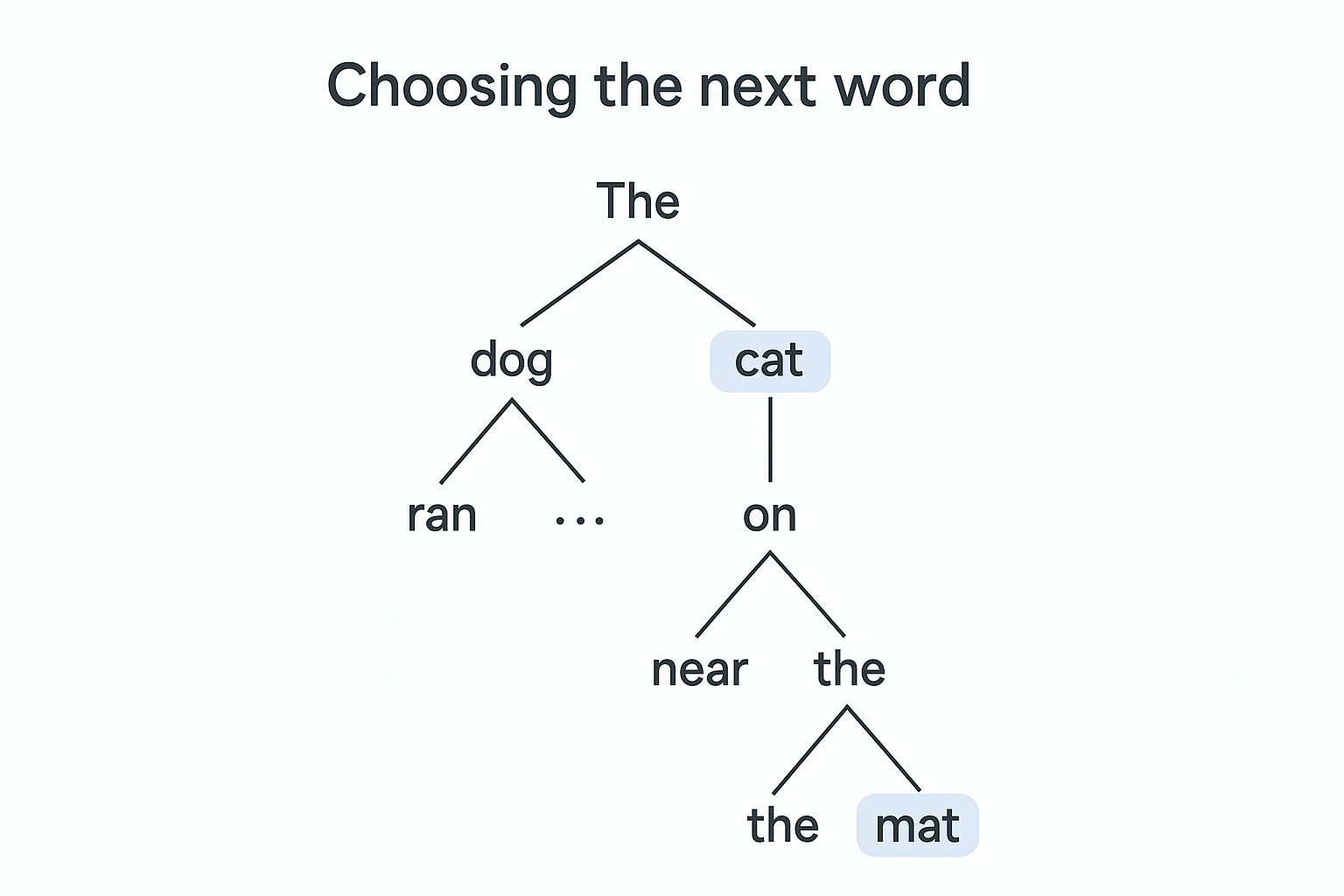
The diagram below illustrates this autocomplete process. It
shows how the model starts with an initial word and then
branches out, predicting and choosing one word at a time to form
a coherent sequence.
This is why prompts matter so much. If the first few tokens in
your prompt lead the model down the wrong track, you'll often
get the wrong kind of output — even if the task is simple.
Tip: When in doubt, imagine you're writing
instructions for a robot that knows a lot but thinks very
literally — because that's exactly what you are doing.
Anatomy of a Simple Prompt
A good prompt is like a clear instruction to a helpful
assistant. The clearer and more focused it is, the more likely
the model is to produce useful, on-topic output. While prompts
can get sophisticated, most of them boil down to a few core
building blocks.
Here's a basic illustration:
Prompt: The sky is
Output: blue.
Now try tweaking it slightly:
Prompt: Complete the sentence: The sky is
Output: blue during the day and dark at night.
These aren't just minor wording changes — they shift how the
model understands your intent. The second prompt gives clearer
direction. You nudged the model into a more structured,
thoughtful answer.
Note: The exact output of these simple prompts can vary based
on model, temperature, and other settings. The purpose here is
to illustrate how even subtle changes in phrasing guide the
model's interpretation and the
type of response it provides.
Let's break a prompt down into four common parts:
-
Instruction – What task should the model
perform?
-
Input – What data or question are you
providing?
-
Context – Any background or extra information
to help steer the response.
-
Output Indicator – A cue that tells the model
what kind of output you expect (e.g., a category label, a
list, a sentence).
Here's a simple example of a prompt with all four elements:
// Instruction:
Classify the text as Positive, Neutral, or Negative.

// Input:
Text: I think the food was okay.

// Output indicator:
Sentiment:
In this case, the instruction clearly defines the task, the
input provides the data, and the output indicator gives the
model a clue on how to format the answer.
Some prompts might only need one or two of these elements,
especially for simpler tasks. But as your tasks get more complex
or ambiguous, structuring your prompt well becomes increasingly
important.
Tip: Be Specific! The most critical principle
in prompt engineering is specificity. Vague prompts get vague
results. Think of it like writing clear API documentation — you
need to be explicit about your inputs, expected outputs, and
desired format.
Example of Specificity:
Bad Prompt:
Help me with customer service.

Good Prompt:
Generate a professional email response to a customer who's been waiting 3 days for a callback from our support team. Include an apology, explanation of next steps, and a direct contact method.
Prompt Formats in Chat Models
Most modern LLM APIs — especially those based on chat interfaces
like
GPT-4o, Claude, or
Gemini — use structured message formats to
mimic human conversation. These models aren't just completing
raw text — they're trained to process a series of
system, user, and
assistant messages.
These roles help shape the context and behavior of the model.
For example:
[
  { "role": "system", "content": "You are a helpful assistant." },
  { "role": "user", "content": "What's the capital of Italy?" }
]
The system message sets the tone or behavior of the
assistant — like a personality or policy primer. The
user message is the actual prompt or question, and
the assistant message (if present) can be used to
provide examples or simulate multi-turn conversations.
Tip: You can think of the system message like a
"character description" in an RPG. It defines how the assistant
should act across the entire interaction.
Single-turn vs Multi-turn Prompts
Even in a single-turn prompt, the model benefits from structured
formatting:
[
  { "role": "user", "content": "Summarize this paragraph in one sentence: ..." }
]
But you can go further and simulate a full conversation. This is
especially useful when you want the model to "remember" past
messages or stay consistent in a dialogue.
Example of a Multi-turn Conversation History:
[
  { "role": "system", "content": "You are a friendly chatbot." },
  { "role": "user", "content": "Tell me a fun fact about cats." },
  { "role": "assistant", "content": "Did you know cats can make over 100 different sounds, whereas dogs can only make about 10?" },
  { "role": "user", "content": "Wow, that's interesting! What about dogs?" }
]
In this multi-turn format, the model receives the entire history
(including its own previous response), allowing it to maintain
context and build upon prior turns.
Note: Message order matters. Models rely on the
chronological sequence of messages to infer context, intent, and
flow. Always pass the full conversation in order — oldest to
newest.
Why Structure Matters
Chat-based models use this structure during training, so
formatting your prompts this way gives them a clearer sense of
who is speaking, what the current request is, and how they
should respond.
[
  { "role": "system", "content": "You are a concise, witty trivia bot." },
  { "role": "user", "content": "Give me a fun fact about octopuses." }
]
This structure is not just a convention — it's how these models
were optimized to work. Even if you're using a playground or
frontend that abstracts it away, the underlying engine still
uses these role-based formats.
And while OpenAI's format is now widely used, other providers
follow similar patterns — whether it's Claude's structured
conversations or Gemini's turn-based dialogue model. Mastering
this format is essential for consistent, quality outputs.
Playground Tip: If you're using the OpenAI
Playground, switch to Chat mode to access
structured prompts with role annotations. It more closely
mirrors production environments.
Examples to Play With
Let's wrap this section with some hands-on examples. These show
how tiny changes in phrasing, clarity, and specificity can lead
to drastically better results from a model. Play with them in
your favorite playground (like OpenAI, Claude, or Gemini).
1. Vague vs. Specific Prompts
❌ Prompt:
Tell me about email.

✅ Prompt:
Explain the key components of a professional email, with examples for subject line, greeting, body, and sign-off.
The second version gives the model a clear task and format —
which usually means a better, more structured response.
2. Task Ambiguity vs. Direct Instruction
❌ Prompt:
This sentence seems off.

✅ Prompt:
Rewrite this sentence to be more concise and professional:
"I just wanted to quickly check if you're free for a short call tomorrow."
Be explicit about what you want the model to do. If you're
editing, say so. If you're analyzing tone, say that instead.
3. Demonstrating Output Format
Prompt:
Extract the programming languages mentioned in this paragraph.
Respond in a comma-separated list.

Text:
He built the backend using Python and Go, and handled frontend work with Svelte and TypeScript.

Expected Output:
Python, Go, Svelte, TypeScript
When possible, show the model the output format you want. The
clearer your target format, the more reliably the model will
follow it.
4. Think Step-by-Step (Great for Reasoning Tasks)
Prompt:
A shirt costs $20. It is discounted by 25%. What is the final price? Think step by step.
The phrase "Think step by step" can improve
performance on math and logic tasks. It nudges the model into
generating its reasoning before answering.
Experiment with Variants: Don't settle for the
first prompt you write. Try rewording, reordering, or
reformatting. Prompting is iterative — you'll often improve
performance just by tightening your language.